PiHole as LXC Container on Proxmox
Deploying PiHole as LXC Container
Although I’m super happy with my PiHole setup as it is now, I’ve wondering if I should deploy a second PiHole (as a fallback whenever I need to update the original one). BEfore I even start with that, I’d like to explore how would all that work on a LXC setup. Let’s get started.
Configure NAT/PAT-Bridge
This is not a requisite! I’m just experimenting with my Proxmox VE and would like to explore how NAT/PAT virtual bridges work. Skip this step completely if your network configuration is different.
- Allow NAT/PAT masquerading on
/etc/network/interfaces, on the PVE host. - Restart network to apply changes using
ifreload -a
Download CTE Template and install PiHole
- On your PVE GUI, click on your Datacenter and navigate to Local Directory > CTE Templates > look for your preferred OS-template and download it.
- Click on Create CT and choose your hardware specs according to PiHole’s Prerequisites.
- Given that I’m using a special network configuration for this task, these are my network parameters:
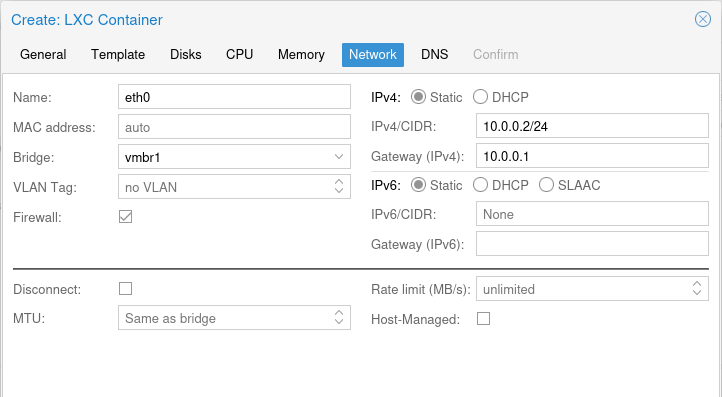
IPv4 is the address that we have established for destination NAT/PAT. Gateway is the address of the Bridge Interface where the container is connected to (
vmbr1in my case).
- Start up container, install updates and download
curland PiHole.
1
2
3
apt update && sudo apt upgrade -y
apt install curl
curl -sSL https://install.pi-hole.net | bash
- Click through installer and set up your options. Once installed, change login password and set up a couple of local DNS records.
Test Setup
- Since NAT/PAT is enabled, we should be able to access PiHole’s GUI by calling
http:<vmbr0-IP>:80/admin. For the same reason, clients should be able to access PiHole for DNS resolution by calling<vmbr0-ip>:53. - On a host attached to
vmbr0, change network settings so that DNS Server calls nowvmbr0’s IP. Test hostname resolution and internet connectivity. - While checking the queries on the PiHole GUI, I noticed that almost all come from
vmbr1’s IP - this is because of my NAT/PAT configuration. My hosts belong tovmbr0’s network, but due to the NAT/PAT translation, all DNS queries seem to come from avmbr1IP.
This post is licensed under CC BY 4.0 by the author.